
XinChào Anh/Chị,
Để giải quyết lỗi Anh/Chịđang gặp phải, Anh/Chị vui lòng làm theo hướng dẫn bên dưới.
Bước 1: Tải file chữ ký số theo link sau https://drive.google.com/file/d/17sQRMbDBZbb-IeXKyxRaM8anr9OSynNb/view?usp=sharing
Bước 2: Giải nén file DigiCertTrustedRootG4
Chuột phải vào file DigiCertTrustedRootG4 vừa tải về chọn Extract Here
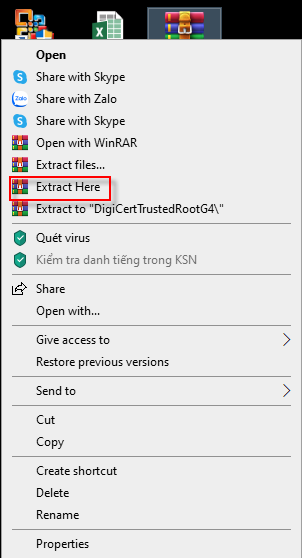
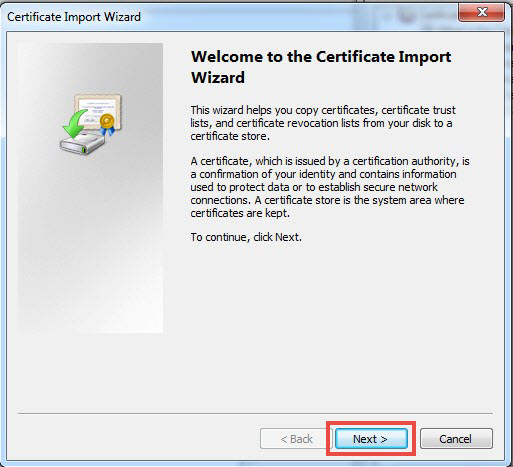
Sau đó nhấn đôi vào file vừa giải nén Install Certificate…

Chọn Next
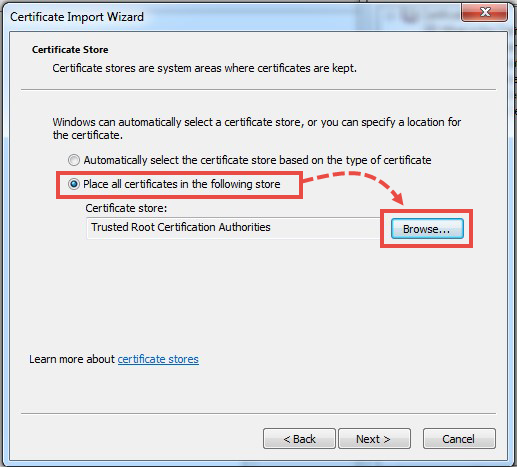
Chọn Place all certificates in the following store và nhấn Browse.
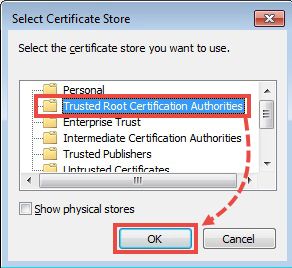
Chọn Trusted root certification authorities và nhấn OK.
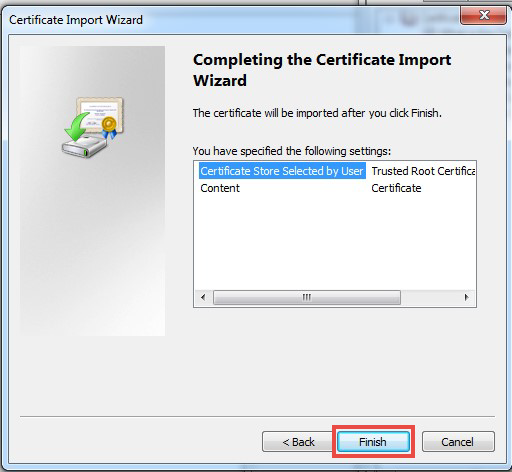
Nhấn Next → Finish.
Bước 3: Chạy cài đặt lại Kaspersky.
Nếu xử lý không thành công, Anh/Chị vui lòng phản hồi lại mail này giúp.
Trân trọng
Support Team
Công ty NTS Security - Nhà phân phối Kaspersky tại Việt Nam
Địa chỉ: 20 Tăng Bạt Hổ, P.11, Q. Bình Thạnh, Hồ Chí Minh
Tổng đài hỗ trợ kỹ thuật: 1900 1787