
Xin Chào Anh/chị
Anh/Chị khởi động máy tính vào chế độ safe mode của windows =>Vào Start > Run nhập regedit =>enter
Thông số chỉnh reset pass trên KES
You can try to manually remove the password via Windows registry.
All you need to do (on the client where you need to uninstall KES) is to go to:
HKEY_LOCAL_MACHINE\SOFTWARE\KasperskyLab\protected\KES10SP1\settings (32bit OS)
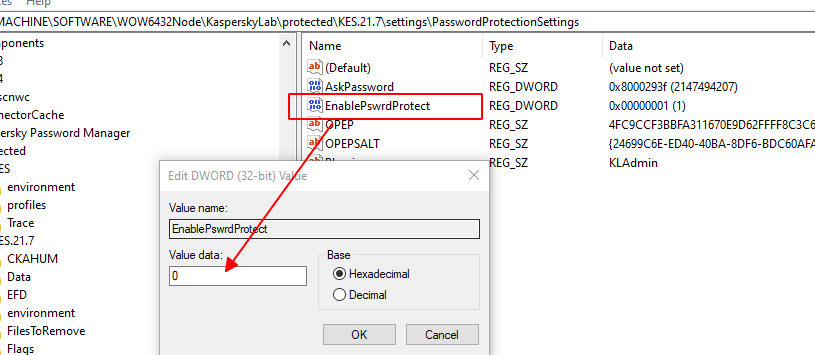
HKEY_LOCAL_MACHINE\SOFTWARE\WOW6432Node\KasperskyLab\protected\KES.21.7\settings\PasswordProtectionSettings (64bit OS)
set "EnablePswrdProtect" to "0"
delete VALUE DATA of "OPEP"
All you need to do (on the client where you need to uninstall KES) is to go to:
HKEY_LOCAL_MACHINE\SOFTWARE\KasperskyLab\protected\KES10SP1\settings (32bit OS)
HKEY_LOCAL_MACHINE\SOFTWARE\WOW6432Node\KasperskyLab\protected\KES.21.7\settings\PasswordProtectionSettings (64bit OS)
set "EnablePswrdProtect" to "0"
delete VALUE DATA of "OPEP"
 After you reboot the OS you will be able to uninstall KES without a password.